Clapova vs Opus Clip: clip a long video or create one with AI? (2026)
By The Clapova team · Published · Updated · 7 min read

In short
- Opus Clip is for pulling short clips out of a long video you already have (podcast, webinar, livestream); Clapova is for making a video without a shoot, by generating the shots with AI models and editing them.
- Opus Clip offers AI clipping (ClipAnything), reframing, automatic captions in 20+ languages, a multi-network scheduler on the Pro plan, an iOS app and an MCP server (checked October 16, 2026).
- Clapova offers a French-first interface, a daily free plan that includes video (20 credits a day, 60 a month at most, with a watermark and at 720p), a multitrack timeline and direct publishing to Facebook and Instagram. It has automatic animated captions, 1:1 and 4:5 projects, but no team mode.
- Pricing: Opus Clip Starter at $15 a month and Pro at $29 a month (opus.pro/pricing, checked October 16, 2026); Clapova Discovery at €19 a month including VAT.
In one sentence: Opus Clip starts from a video that exists and turns it into shorts; Clapova starts from an idea and makes the footage. The two tools overlap on captions, publishing and AI agents, but they solve different problems. Disclosure: the Clapova team publishes this article. Every fact about Opus Clip links to a source accessed on October 16, 2026.
Opus Clip at a glance
OpusClip (opus.pro) is a web tool for clipping video. You upload a long video, or paste a YouTube link, and its ClipAnything model finds the strong moments and turns them into short clips. It reframes the shot around the subject, adds word-by-word animated captions, B-roll and a virality score. Its site claims more than 20 million users (OpusClip home page, checked October 16, 2026).
The company also offers Agent Opus, which generates videos from a prompt, a script or a URL with third-party models: Veo, Gemini Omni, Kling, Luma, Pika, Hailuo, MiniMax, Hunyuan, Seedance, PixVerse and Grok Imagine (OpusClip llms.txt, checked October 16, 2026). Clipping remains its strength: it is the core of the product and of its free plan.
Clapova at a glance
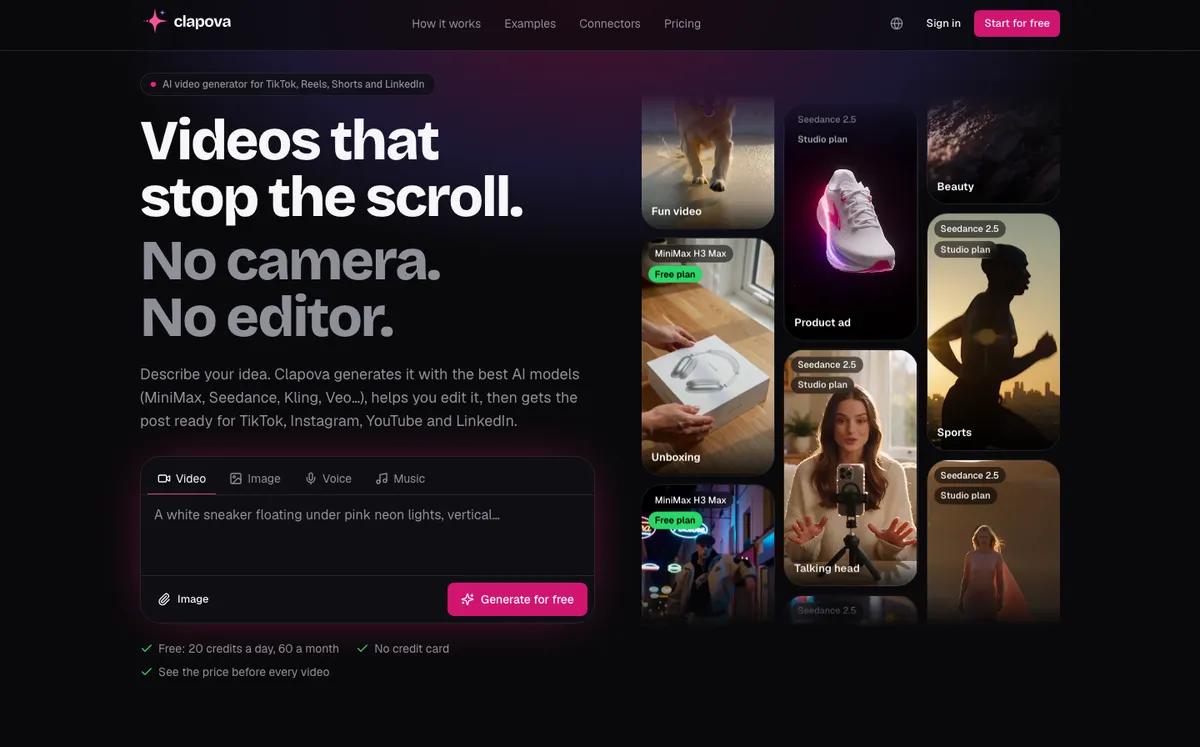
Clapova is a web-based AI video studio, designed in France, in French. You describe a video; Clapova generates the shots with third-party models (MiniMax H3, Seedance, Kling, Wan, Veo…), adds a voice-over and music, then edits everything on a multitrack timeline. An Agent can run these steps for you, using one of 10 editing templates.
You can also upload your own images and clips to the Library, but Clapova does not cut a long video into highlights: it has no such feature. Projects are 16:9 or 9:16, and a generated clip lasts 10 seconds (8 for Veo).
Quick comparison
| Criterion | Clapova | Opus Clip |
|---|---|---|
| Main use | Make a video without a shoot: generate the shots, then edit | Pull short clips from an existing long video; Agent Opus to generate |
| AI models | 90+ models: MiniMax H3, Seedance 2.x, Kling 3.0 Pro, Wan 3.0, Veo… | Agent Opus: Veo, Kling, Seedance, Hailuo, MiniMax, Luma, Pika, Grok Imagine… |
| Editing and captions | Multitrack timeline; automatic word-by-word animated captions transcribed from speech | Automatic cutting, reframing and animated captions, 20+ languages |
| Voice and music | Voice-over (14 voices chosen for French), music, sound effects | AI voice-over: 20 a day on paid plans |
| Formats | 16:9 and 9:16 | 16:9, 9:16 and 1:1 by reframing |
| Publishing | Direct to Facebook and Instagram; assisted for TikTok, YouTube, LinkedIn and X; calendar | Pro: scheduling to YouTube, TikTok, Instagram Reels, Facebook Page, LinkedIn, X (beta) |
| Interface language | Native French, English | English; site partly translated into French |
| Free plan | 20 credits a day, 60 a month at most; video included; watermark, 720p | Free: watermark, files kept 3 days, export up to 1080p |
| Entry price | Discovery: €19/month incl. VAT | Starter: $15/month |
| API / MCP | MCP server (about 60 tools), Claude Code plugin | REST API and MCP server (29 tools), on a paid plan |
Opus Clip and Clapova pricing
The OpusClip pricing page lists four plans (checked October 16, 2026): Free at $0, Starter at $15 a month, Pro at $29 a month and Business on quote. The page shows neither yearly prices nor the credits or minutes in each plan. The free plan adds a watermark and deletes files after 3 days. Starter removes the watermark; Pro adds the scheduler, the API, the MCP connector and up to 4 users. Agent Opus has its own pricing page, which shows no amounts.
Clapova shows its prices in euros including VAT on the Pricing page: Free (20 credits a day, 60 a month at most), Discovery at €19 (260 credits), Creator at €59 (820 credits) and Studio at €129 a month (1,800 credits). Each generation shows its price before you start it. Examples for a 10-second clip at 720p:
- MiniMax H3 Max: 14 credits, included in the Free plan (about €1.00 at the Studio rate).
- Kling 3.0 Pro: 58 credits, Studio plan (about €4.16).
- Seedance 2.0: 59 credits, Studio plan (about €4.23).
An Opus Clip credit and a Clapova credit do not measure the same thing. Compare the cost of a finished video in your own workflow instead.
When to choose Opus Clip
- You already have long videos (podcast, interview, webinar, Twitch stream) and want shorts from them. Clapova does not do this clipping.
- You want automatic captions transcribed from speech, in English or about twenty other languages. Clapova transcribes speech too, in fewer languages.
- You post square 1:1 videos: Opus Clip reframes to that format, Clapova does not offer it.
- You want to schedule to YouTube, TikTok, LinkedIn or X from the same tool: the Pro plan scheduler covers them.
- You work as a team or from an iPhone: Opus Clip offers seats on Pro and Business and an iOS app. Clapova has neither a team mode nor a mobile app.

When to choose Clapova
- You have no footage: Clapova generates the shots, the voice-over and the music from a prompt, then edits them.
- You want to work in French, from the interface to the Agent, with prices in euros including VAT.
- You want to try video generation every day for free: 20 credits a day, 60 a month at most, about 4 MiniMax H3 Max clips of 10 seconds, with a watermark and at 720p.
- You want to fine-tune the edit by hand on a multitrack timeline, then export to Premiere Pro, DaVinci Resolve or Final Cut Pro.
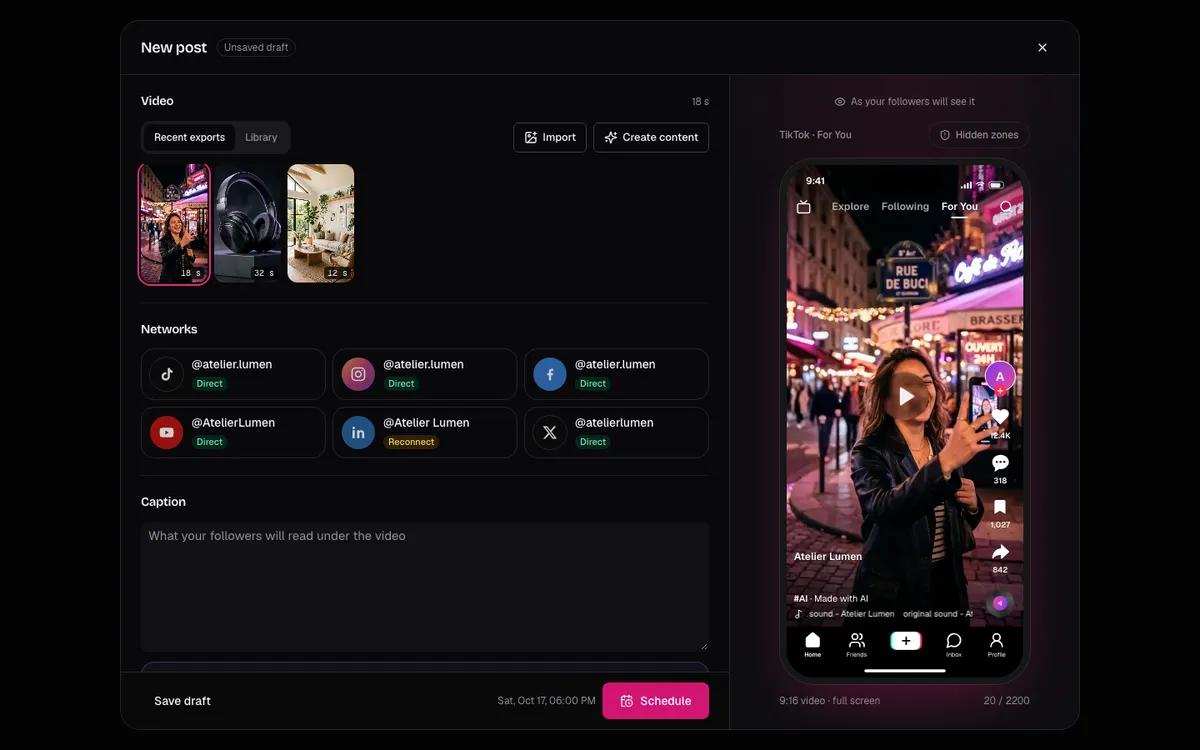
- You want one chain from generation to post copy, calendar and direct publishing to Facebook and Instagram.
Both tools have a virality score. Clapova's rates a video of up to 3 minutes on 6 criteria, and its Fix with AI button sends the changes to the Agent. For other comparisons, read Clapova vs CapCut and Clapova vs Captions.
Verdict
If your raw material is a long video you already shot, Opus Clip is the right tool: clipping, reframing and automatic captions in minutes. If you start from an idea with no footage, Clapova makes the shots and edits them, in French. The two work together: a creator can clip a podcast in Opus Clip and generate the illustration shots in Clapova. Create a free account to test Clapova with the same idea.
Frequently asked questions
Is Opus Clip free?
Yes, OpusClip has a Free plan with no credit card. Videos carry a watermark, files are deleted after 3 days and export goes up to 1080p (opus.pro/pricing, checked October 16, 2026). The page does not show how many credits the free plan includes.
How much does Opus Clip cost?
Starter costs $15 a month and Pro $29 a month; Business is on quote (opus.pro/pricing, checked October 16, 2026). Yearly prices and quotas are not readable on the page.
Can Clapova cut a long video into shorts like Opus Clip?
No. Clapova does not find the highlights of a long video and does not clip it automatically. You can upload your clips to the Library and edit them by hand on the timeline.
Does Clapova add automatic captions?
Yes. Clapova transcribes the voiceover or a video's sound into word-by-word animated captions, in one click in the Studio (about 1 credit per minute, 10 min at most per source). Opus Clip offers it too.
Is Opus Clip available in French?
OpusClip's site has French pages, but part of them stays in English (checked October 16, 2026). Its captions handle French among 20+ languages. Clapova's interface is written in French.
Try Clapova for free
20 free credits every day, no credit card required. Compare it with your current tool on the same prompt.
Sources (checked 10/16/2026)
- OpusClip, home page (accessed October 16, 2026)
- OpusClip, llms.txt (accessed October 16, 2026)
- OpusClip, pricing page (accessed October 16, 2026)
- Agent Opus, pricing page (accessed October 16, 2026)
- OpusClip, scheduler help article (accessed October 16, 2026)
- OpusClip, French version of the site (accessed October 16, 2026)
- App Store, OpusClip for iOS (accessed October 16, 2026)
Product names and trademarks mentioned belong to their respective owners. Third-party facts were checked on the date shown above and may have changed since.